

Table of Contents
Introduction to XLOOKUP vs VLOOKUP
Understanding XLOOKUP vs VLOOKUP is essential for anyone who works with data in Excel, whether for business analysis, academic projects, or daily reporting tasks. These lookup functions are designed to simplify the process of finding and retrieving information from large datasets, but they differ significantly in how they operate and what they offer. As Excel continues to evolve, users are increasingly comparing XLOOKUP VLOOKUP to determine which function best suits their needs. While VLOOKUP has been a long-standing tool in spreadsheets, XLOOKUP represents a modern upgrade that brings flexibility and efficiency to data handling.
Evolution of Lookup Functions in XLOOKUP vs VLOOKUP
The discussion of XLOOKUP VLOOKUP becomes more meaningful when we look at how lookup functions have evolved over time. VLOOKUP was introduced as a simple way to perform vertical searches within a table, and for many years it served as a reliable solution. However, as datasets grew larger and more complex, users began to encounter limitations that made VLOOKUP less effective. This led to the development of XLOOKUP, which was designed to address these shortcomings. In the context of XLOOKUP VLOOKUP, this evolution highlights how Excel has adapted to modern data challenges by introducing more advanced tools.
Syntax Comparison in XLOOKUP vs VLOOKUP
One of the most noticeable differences in XLOOKUP VLOOKUP lies in their syntax. VLOOKUP requires users to specify a lookup value, a table array, a column index number, and a match type. This structure can be confusing, especially when dealing with large tables where column positions may change. In contrast, XLOOKUP uses a simpler and more logical structure by separating the lookup array and the return array. This makes formulas easier to read and maintain. When analyzing XLOOKUP VLOOKUP, the improved syntax of XLOOKUP is a major advantage for both beginners and advanced users.
Flexibility in Data Lookup with XLOOKUP vs VLOOKUP
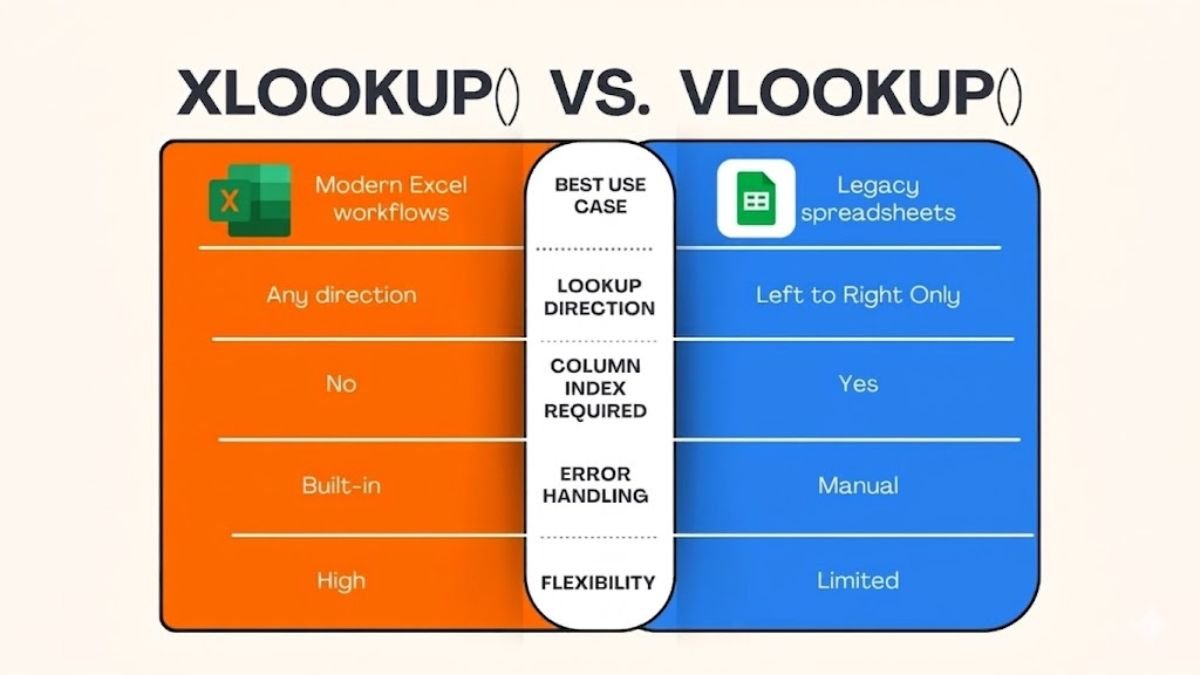
Flexibility is a key factor in the XLOOKUP vs VLOOKUP comparison. VLOOKUP is limited to searching from left to right, which means the lookup value must always be in the first column of the dataset. This restriction can force users to rearrange their data, adding unnecessary complexity. XLOOKUP removes this limitation by allowing searches in any direction, including right to left, top to bottom, or even bottom to top. In the XLOOKUP VLOOKUP debate, this flexibility makes XLOOKUP a far more adaptable tool for handling diverse datasets.
Accuracy and Reliability in XLOOKUP vs VLOOKUP
Accuracy is critical when working with data, and this is another area where XLOOKUP VLOOKUP shows clear differences. VLOOKUP often requires users to specify whether they want an exact or approximate match, and failing to do so correctly can lead to inaccurate results. XLOOKUP, on the other hand, defaults to exact matches, reducing the risk of errors. Additionally, because XLOOKUP directly references the return range, it is less likely to break when changes are made to the dataset. In the XLOOKUP VLOOKUP comparison, this reliability makes XLOOKUP a safer choice for critical data tasks.
Handling Large Datasets in XLOOKUP vs VLOOKUP
As datasets grow in size, performance becomes increasingly important in the XLOOKUP vs VLOOKUP discussion. VLOOKUP can slow down when applied to large amounts of data, especially if multiple formulas are used across a spreadsheet. XLOOKUP is designed to handle modern workloads more efficiently, allowing users to perform complex lookups without sacrificing speed. In the context of XLOOKUP vs VLOOKUP, this improved performance can significantly enhance productivity, particularly in professional environments where time is a valuable resource.
Dynamic Arrays and Modern Features in XLOOKUP vs VLOOKUP
Another major advantage in the XLOOKUP VLOOKUP comparison is the support for dynamic arrays. XLOOKUP can return multiple values at once, spilling results into adjacent cells automatically. This eliminates the need for multiple formulas and simplifies data analysis. VLOOKUP does not natively support this feature, which limits its usefulness in more advanced scenarios. In the evolving landscape of Excel, the inclusion of dynamic arrays in XLOOKUP demonstrates how modern features are shaping the future of data management.
Error Management in XLOOKUP VLOOKUP
Error handling is often overlooked, but it plays a crucial role in the usability of lookup functions. In the XLOOKUP VLOOKUP comparison, VLOOKUP requires additional functions to handle errors, making formulas longer and more complex. XLOOKUP includes a built-in option for managing errors, allowing users to define a custom response when a value is not found. This makes formulas cleaner and easier to understand. As a result, XLOOKUP provides a more streamlined approach to error management compared to VLOOKUP.
Real-World Applications of XLOOKUP VLOOKUP
The practical use of XLOOKUP VLOOKUP can be seen in various real-world scenarios. In business environments, these functions are used to match customer data, track inventory, and generate reports. In education, they help students analyze datasets and complete assignments efficiently. When comparing XLOOKUP VLOOKUP, it becomes clear that XLOOKUP is better suited for complex tasks, while VLOOKUP remains useful for simpler operations. Understanding when and how to use each function can greatly improve overall efficiency.
Learning Curve in XLOOKUP vs VLOOKUP
For many users, the learning curve is an important consideration in the XLOOKUP vs VLOOKUP discussion. VLOOKUP has been around for a long time, which means there are countless tutorials and resources available. However, its limitations can make it harder to master in advanced scenarios. XLOOKUP, while newer, is designed to be more intuitive, making it easier to learn and apply. In the XLOOKUP VLOOKUP comparison, this ease of learning makes XLOOKUP an attractive option for new users.
Limitations of XLOOKUP vs VLOOKUP
Despite its advantages, XLOOKUP is not without limitations. One of the main concerns in the XLOOKUP vs VLOOKUP comparison is compatibility. XLOOKUP is only available in newer versions of Excel, which can create challenges when sharing files with users who have older software. VLOOKUP, on the other hand, is widely supported across different versions. This means that in certain situations, VLOOKUP may still be the more practical choice, even if it lacks the advanced features of XLOOKUP.
Future Trends in XLOOKUP vs VLOOKUP
Looking ahead, the comparison of XLOOKUP vs VLOOKUP reflects broader trends in data management and software development. As tools become more advanced, there is a growing emphasis on flexibility, automation, and user-friendly design. XLOOKUP embodies these trends by offering a more powerful and adaptable solution for data lookup tasks. While VLOOKUP will likely remain in use for years to come, the shift toward XLOOKUP indicates a move toward more modern and efficient methods.
Final Thoughts on XLOOKUP vs VLOOKUP
The debate of XLOOKUP vs VLOOKUP ultimately comes down to choosing the right tool for the task at hand. VLOOKUP has proven its value over time, but its limitations make it less suitable for today’s complex data needs. XLOOKUP, with its advanced features and improved usability, offers a more comprehensive solution for modern users. By understanding the strengths and weaknesses of XLOOKUP vs VLOOKUP, individuals can make informed decisions and enhance their productivity in Excel. As technology continues to evolve, embracing newer tools like XLOOKUP will be essential for staying competitive and efficient in any data-driven field.